
Free · Windows
Tela
Tracks your Claude Code usage. Nothing ever leaves your machine.
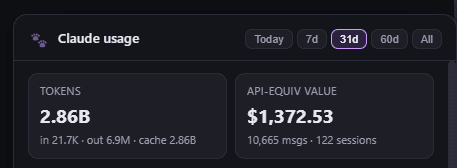
Tela lives in the system tray as a little paw, down by the clock. Click her and a panel drops down with where your Claude Code tokens went: how many, what they’d have cost, and which projects, hours and models used them.
She only reads the transcript files Claude Code already writes to your computer. No API calls, no account, no cloud.
What she shows you
Tokens and what they're worth
Input, output and cache tokens, and what the same work would have cost at API prices. On a subscription that figure is notional, a measure rather than a bill.
Where they went
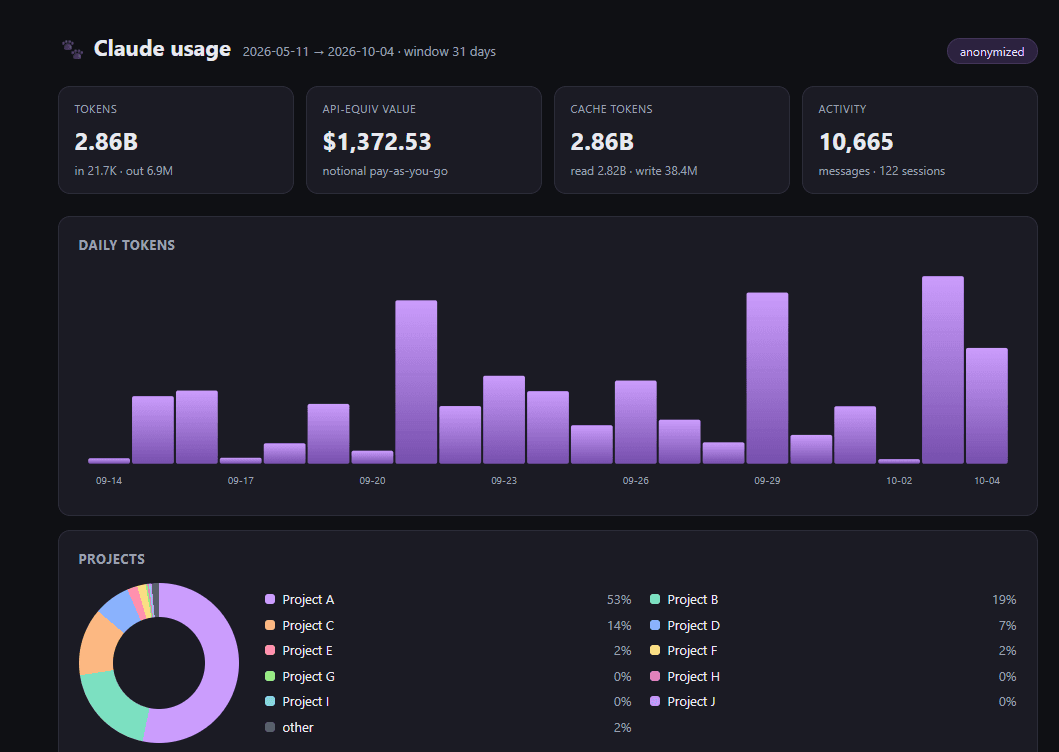
Which projects used the most, which hours of the day you really work, and how the load split between models.
Pick the period
Choose what she counts: today, the last 7, 31 or 60 days, or everything. A report exported from the panel covers the period you picked.
History that stays
Claude Code clears out old transcripts after a month or two. Tela saves each day's totals as she goes, so a day stays counted after its transcripts are gone.
A report you can send
Export everything as a single HTML file, charts and all, that opens anywhere without a connection. It adds a day-by-day chart on top of what the panel shows. Rather keep your project names to yourself? Export it anonymized and they become Project A, B and C.
Tela is free, and the code is on GitHub.
She runs on Windows and needs Node.js. The README takes you through it in a few commands.
Get Tela on GitHubTela is a Windows port of usage, aqua5230’s menu-bar monitor for the Mac.